
This is the second installment in the series "Current State of Local LLMs." In the previous Issue 1: What are Local LLMs – An Overview, we examined the overall landscape of local LLMs. In this follow-up, we will address three topics that inevitably come up when actually running a model on your own hardware: Open Weights, Quantization, and VRAM. While these terms may seem daunting at first, there is no need to fear them if you follow them step by step. This time, we will start with the contents of what is distributed, verify how much memory it uses, examine what is being done to reduce memory usage, and determine whether it fits on your local GPU, using specific numbers.
What is Distributed in Open Weights
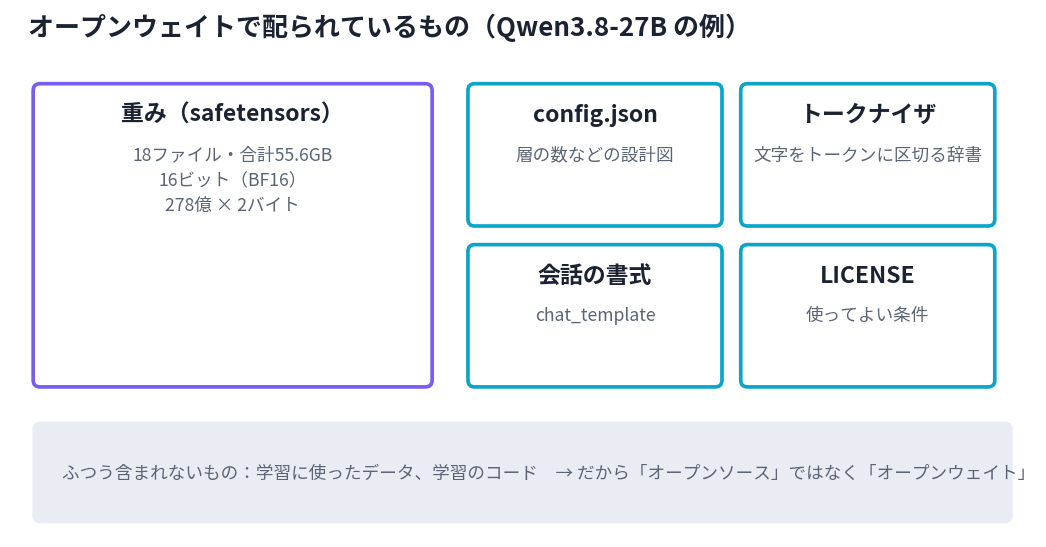
First, let us clarify what it means for a model to be "distributed." Here, we look at an example of the Qwen3.8-27B model published on Hugging Face. As of the check on November 6, 2026, the following files were listed.
First are the weight files. There were 18 files in the safetensors format, totaling 55.6GB. These are distributed at 16-bit (BF16) precision. With approximately 27.8 billion parameters, and 2 bytes per parameter, the calculation is 27.8 billion × 2 bytes = 55.6GB, which matches the total file size exactly. Weights are the collection of numbers that the model has acquired through learning. They constitute the majority of the model itself.
In addition to weights, there are several other files. config.json is a blueprint such as the number of layers. tokenizers such as tokenizer.json are dictionaries for splitting text into units called tokens. chat_template.jinja defines the conversation format, generation_config.json contains generation settings, and LICENSE is the license document.
Here, I would like to make one important distinction. The data used for training and the training code are usually not included. Therefore, this distribution method is distinguished from "open source" and is called "open weights." This means that while the weights are public, not everything about how they were created is public.
Licenses vary by model. Qwen3.8-27B and Qwen3.6-35B-A3B use Apache-2.0, and DeepSeek-V4.1-Flash uses MIT. Kimi K3.1 Pro uses a proprietary license with conditions attached to large-revenue API providers, among others (Article on the weight release of Kimi K3.1 Pro). It is reassuring to develop the habit of checking the license before use.
How Much Memory Do Weights Use
Next, let us look at how much memory the weights consume. The calculation is very simple. Weight memory (in bytes) is calculated as: Number of Parameters × Bits per Parameter ÷ 8.
For Qwen3.8-27B (approximately 27.8 billion parameters), this results in 55.6GB at 16-bit, 27.8GB at 8-bit, and 13.9GB at 4-bit. For Qwen3.6-35B-A3B (approximately 36 billion parameters), it is 71.9GB at 16-bit, 36.0GB at 8-bit, and 18.0GB at 4-bit. The publicly released files for Kimi K3.1 Pro total approximately 1.56TB, and it was trained with 4-bit precision in mind.
| Model | Parameters | 16-bit | 8-bit | 4-bit |
|---|---|---|---|---|
| Qwen3.8-27B | Approx. 27.8B | 55.6GB | 27.8GB | 13.9GB |
| Qwen3.6-35B-A3B | Approx. 36B | 71.9GB | 36.0GB | 18.0GB |
| Kimi K3.1 Pro | ― | ― | ― | Approx. 1.56TB (Public Files) |
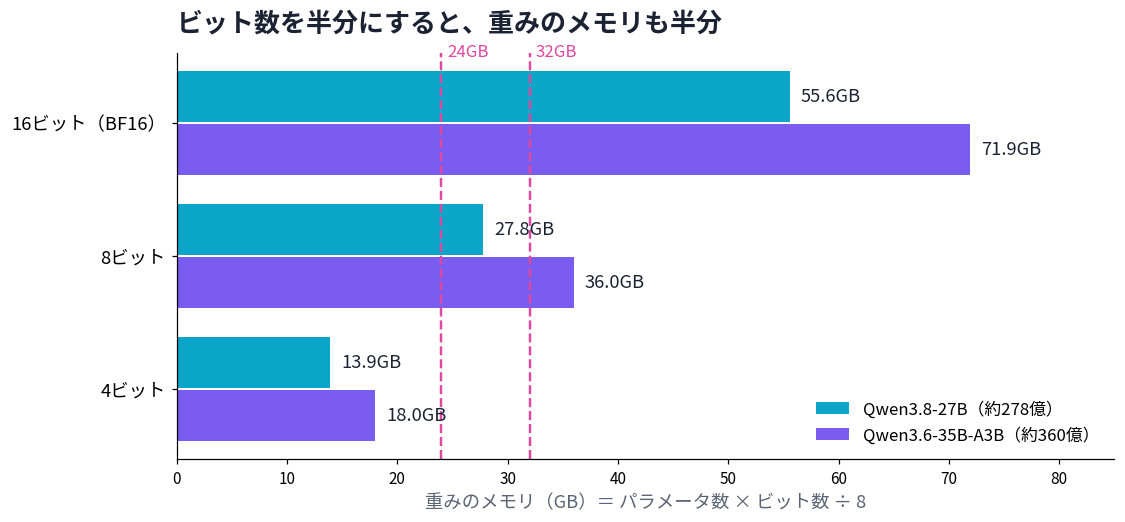
From this table, we can see that halving the bit count halves the memory usage. This leads to our next topic: quantization.
What is Quantization?
Quantization is the process of representing a single number with fewer bits. Reducing the bit count decreases memory usage and the amount of data read. In return, differences in fine values are rounded off, which may lead to a loss of precision. It is easy to understand as a trade-off between memory and precision.
For 16-bit, BF16 is the standard format for training and distribution. At 8-bit, there is FP8 (8-bit floating-point) and INT8 (integer). At 4-bit, methods that quantize only the weights to 4 bits are commonly used. Examples include the llama.cpp GGUF format 4-bit (Q4 series), AWQ, and GPTQ.
There are two main approaches to quantization. One is "Post-Training Quantization (PTQ)," where rounding occurs after training is complete. The other is "Quantization-Aware Training (QAT)," where training is conducted with rounding in mind. Kimi K3.1 Pro uses QAT, with weights in MXFP4 and activations in MXFP8.
Let us take a closer look at how MXFP4 works here. In MXFP4, values are divided into groups of 32 (blocks). Each group has one common scale (a power of 2 in 8-bit), and each individual value is represented as a 4-bit floating-point number. The average per value then becomes 4 + 8 ÷ 32 = 4.25 bits. Since 8 ÷ 32 = 0.25, the calculation is 4 + 0.25 = 4.25 bits.
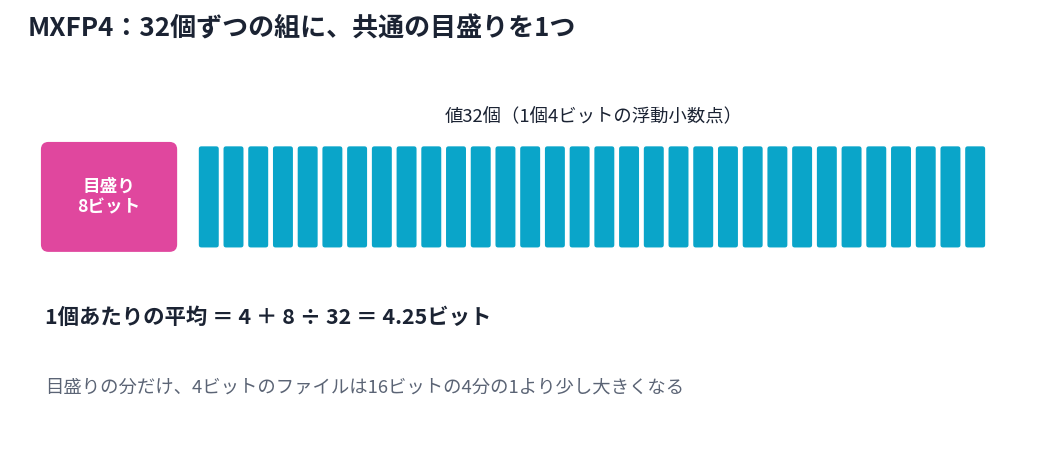
Note that quantized values require a scale (scale factor) to restore the original magnitude. Due to the scale, the 4-bit file becomes slightly larger than exactly half of half. The number 4.25 bits mentioned earlier represents this "slight" increase. Additionally, for some layers, it is difficult to reduce precision, so some structures retain certain parts at higher precision.
What is VRAM?
We have discussed memory thus far, but when running on a GPU, the key factor is VRAM. VRAM refers to the memory installed on the GPU. Since the GPU performs calculations on data within the VRAM, necessary data must be loaded into VRAM to run it quickly.
There are three main things that fit into VRAM. First, the weights. Second, the KV cache, which stores intermediate results of conversations. Third, the computation workspace, which includes intermediate values and software overhead. Only when all three fit can the model run smoothly.
Let us look at the public specifications of representative GPUs.
| Device | VRAM | Bandwidth |
|---|---|---|
| RTX 3090 | 24GB | 936GB/s |
| RTX 4090 | 24GB | 1,008GB/s |
| RTX 5090 | 32GB | 1,792GB/s |
| NVIDIA DGX Spark | 128GB (Shared by GPU and CPU) | 273GB/s |
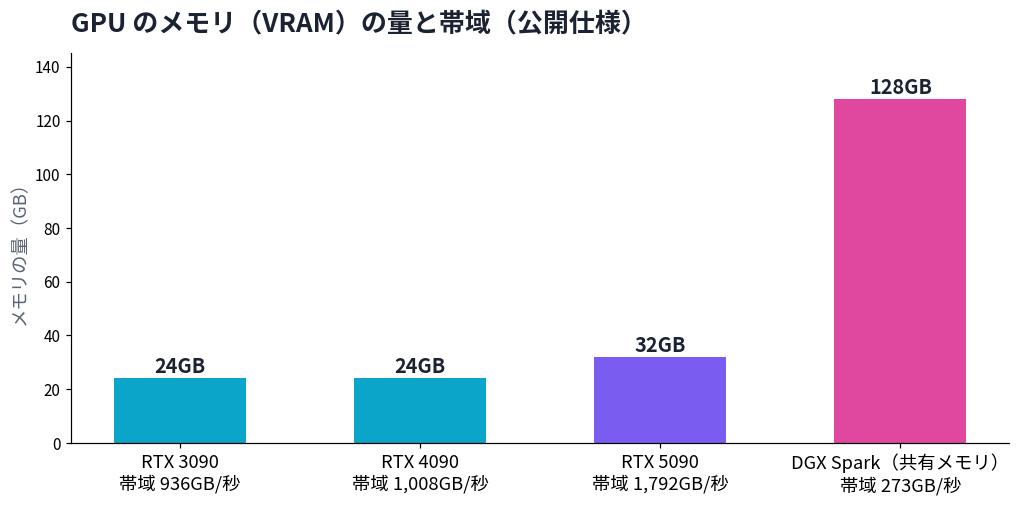
On machines like Mac, where CPU and GPU share memory, there is no distinction between VRAM and main memory. We previously used dozens of RTX 3090 (24GB) cards and now run models on business-grade equipment (From Homemade GPU Machines to Business Servers).
Will It Fit on a 24GB GPU? Let's Calculate
Now, let us actually calculate whether Qwen3.8-27B will fit on a 24GB GPU. This calculation includes the KV cache.
First, the amount per token for the KV cache. Qwen3.8-27B has 64 layers, of which 16 layers use full attention (viewing the entire context), while the remaining 48 layers use a method where the stored amount does not increase as context grows (linear attention). Therefore, only 16 layers are used for KV cache calculation. The amount per token is 2 (Key and Value) × 16 layers × 4 (KV heads) × 256 (head dimension) × 2 bytes (16-bit) = 65,536 bytes, or approximately 64KB.
Using this, we calculate the KV cache based on context length. At 32,768 tokens, it is 65,536 × 32,768 = 2,147,483,648 bytes, or approximately 2.15GB. At the maximum of 262,144 tokens, it is 65,536 × 262,144 = 17,179,869,184 bytes, or approximately 17.2GB.
Let us combine this with the weights to see if it fits on 24GB.
| Configuration | Weights | KV Cache | Total | Fits on 24GB? |
|---|---|---|---|---|
| 16-bit | 55.6GB | ― | 55.6GB | No |
| 8-bit | 27.8GB | ― | 27.8GB | No |
| 4-bit + 32,768 tokens | 13.9GB | 2.15GB | Approx. 16.0GB | Yes (Remaining approx. 8GB for workspace, etc.) |
| 4-bit + 262,144 tokens | 13.9GB | 17.2GB | Approx. 31.1GB | No (Even with 32GB, there is almost no margin for workspace) |
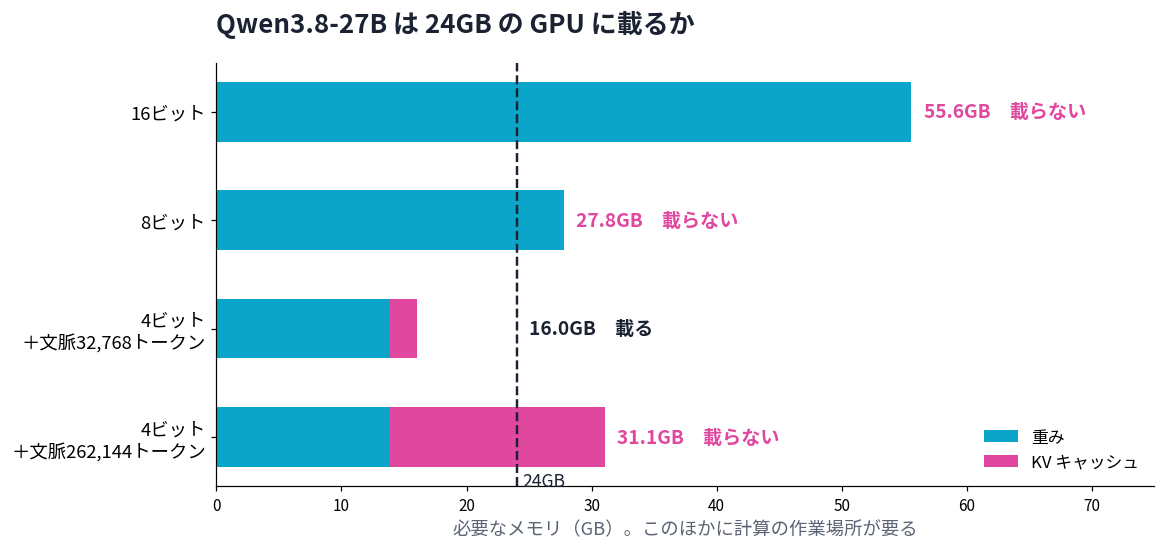
55.6GB at 16-bit will not fit. 27.8GB at 8-bit will also not fit. Adding 2.15GB of KV cache for 32,768 tokens to 13.9GB at 4-bit results in approximately 16.0GB, which fits on 24GB. The remaining approx. 8GB can be used for the workspace and other purposes. On the other hand, using the maximum of 262,144 tokens even at 4-bit results in 13.9GB + 17.2GB = approx. 31.1GB, which will not fit on 24GB. Even with a 32GB GPU, there is almost no margin for the workspace.
Note that halving the KV cache to 8-bit will halve its size. Additionally, Qwen3.6-35B-A3B is 18.0GB at 4-bit, so it fits on 24GB, but the margin available for context is smaller than that of Qwen3.8-27B.
Options When It Does Not Fit
If the calculation shows that it will not fit, you have several options. These include using a smaller model, reducing the bit count, shortening the context, using multiple GPUs, or offloading parts of the weights to main memory or SSD. The last method relates to the MoE discussion mentioned in Issue 1, but it reduces speed. The choice depends on balancing precision, speed, and your available hardware.
Next Time
This time, we looked at the foundation of running local LLMs: open weights, quantization, and VRAM. Although there were many numbers, the calculation formulas are all simple, so please apply them to the models and hardware you wish to use. In the next Issue 3: Prefill and Decode, we will discuss speed. We will examine where time is spent by dividing the process into two stages: prefill and decode.
Next: Issue 3: Prefill and Decode – How LLMs Read and Write Text