
Measuring LLM performance on an RTX 3090: How many tokens per second are needed for reading speed? showed that a 176B model achieved 5 tokens per second on a 24GB GPU. When VRAM is insufficient and computation is offloaded to the CPU, speed is determined by the CPU confirmed that the newness of the GPU becomes ineffective the moment computation is offloaded to the CPU.
Both of these scenarios assume that "the model does not fit in VRAM." This time, we measured the case where it does fit. We used a GPU with 96GB of VRAM and ran a 300B-class model without offloading a single layer to the CPU. All figures are measurements taken on this site.
Measurement Environment
| Item | Details |
|---|---|
| GPU | NVIDIA RTX PRO 6000 Blackwell Max-Q Workstation Edition |
| VRAM | 97,887 MiB (approx. 96GB) |
| Host RAM | 1,512GB |
| Execution Environment | llama.cpp (built locally for CUDA 12.8, sm_120) |
| Benchmark Method | llama-bench (prompt 512, generation 128, 3 runs) |
Entire 300B-Class Models Fit
Unit is tokens per second (number of tokens generated per second). Higher is faster.
| Model | Total Parameters | File Size | Generation | Prompt Processing | Max VRAM |
|---|---|---|---|---|---|
| Qwen3.8-Flash-Next (3-bit) | 176.94 B | 83.80 GiB | 79.59 | 2416.99 | 57.6 GiB |
| DeepSeek-V4-Flash-0731 (1.75-bit) | 284.33 B | 80.93 GiB | 68.40 | 1217.82 | 81.7 GiB |
| GLM-5.3-Flash (1.75-bit) | 320.76 B | 90.87 GiB | 66.97 | 921.64 | 89.2 GiB |
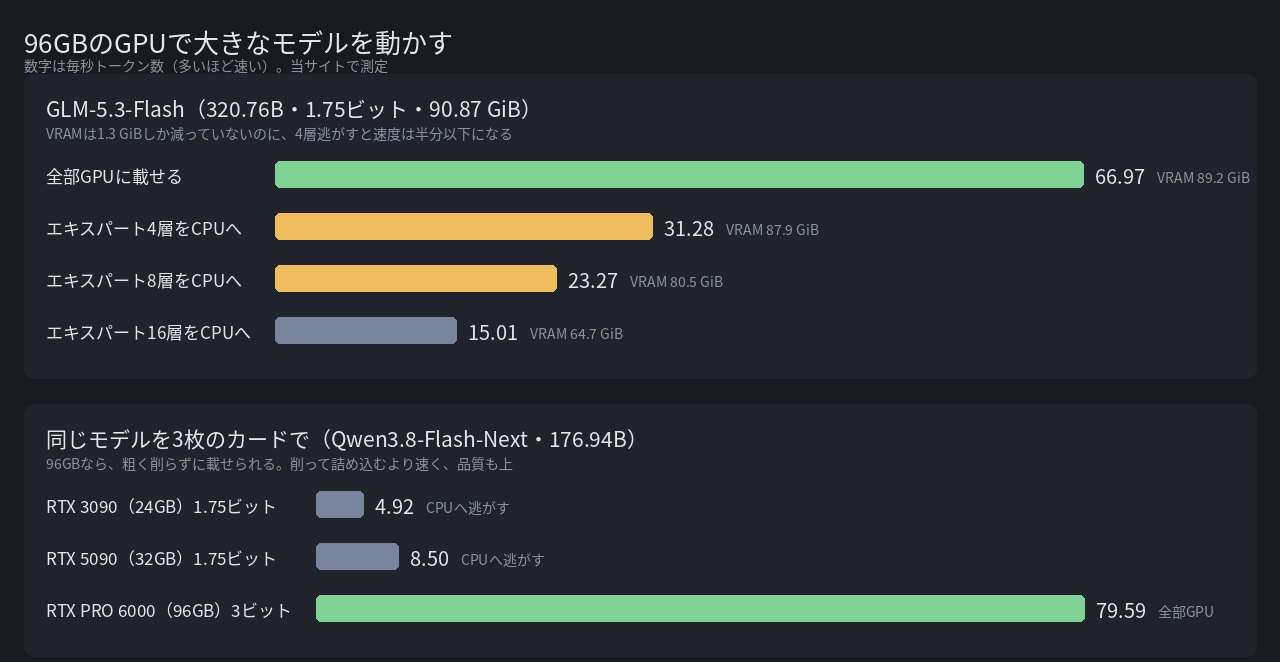
The 320B model achieves 67 tokens per second. On a 24GB GPU, even the 176B model scored only 4.92.
I will note one instance where my site's assumption was incorrect. The distribution file for GLM-5.3-Flash is 97.6GB, and I had expected it not to fit in a 96GB GPU. However, it actually fit. The maximum VRAM usage was 89.2 GiB. The size of the distribution file does not directly equate to VRAM usage.
Offloading Just 4 Layers Reduces Speed to Less Than Half
This is the most practically useful result from this test. Using GLM-5.3-Flash, we varied the number of expert layers offloaded to the CPU.
| Configuration | Generation | Prompt Processing | Max VRAM |
|---|---|---|---|
| All on GPU | 66.97 | 921.64 | 89.2 GiB |
| 4 Expert Layers to CPU | 31.28 | 782.16 | 87.9 GiB |
| 8 Expert Layers to CPU | 23.27 | 528.92 | 80.5 GiB |
| 16 Expert Layers to CPU | 15.01 | 324.37 | 64.7 GiB |
Just by offloading 4 layers, the score drops from 66.97 to 31.28. That is less than half. And at that point, VRAM usage only decreased from 89.2 to 87.9 GiB, a reduction of only 1.3 GiB.
This means that if VRAM is slightly insufficient, speed is halved. The state of "if only there were another 2GB, it would all fit" is the least cost-effective. When selecting hardware, you should choose a configuration that fits comfortably, not one that fits just barely.
The drop was even steeper with DeepSeek-V4-Flash. Offloading 16 layers reduced the speed from 68.40 to 3.93, a factor of 1/17th. This is likely because the larger the model, the heavier the weights per layer.
Running the Same Model Across Three Cards
Qwen3.8-Flash-Next was compared under the same conditions across three measurement runs.
| Card | VRAM | Quantization | Generation |
|---|---|---|---|
| RTX 3090 | 24GB | 1.75-bit | 4.92 |
| RTX 5090 | 32GB | 1.75-bit | 8.50 |
| RTX PRO 6000 | 96GB | 3-bit | 79.59 |
Loading a higher-precision model onto 96GB is 16 times faster and yields better quality than cramping a roughly quantized version into 24GB.
In When VRAM is insufficient and computation is offloaded to the CPU, speed is determined by the CPU, we wrote that "there was almost no speed difference between 1.75-bit and 4-bit quantization." The purpose of reducing capacity is to fit into memory, not to increase speed. This time, we confirmed the reverse: if it fits, it is better not to reduce precision.
Verified Documented Behaviors with Actual Tests
Only Qwen3.8-Flash-Next showed somewhat unusual results. Although the file size was 83.80 GiB, VRAM usage was only 57.6 GiB. Despite specifying that everything should be loaded onto the GPU, 26 GiB remained unloaded.
This is likely related to the 51B N-gram embeddings mentioned in MoE and quantization change LLM memory requirements, necessitating separate consideration of VRAM and host RAM. That article noted based on documentation that vLLM's official recipes "assume offloading this part asynchronously to host RAM." The same seems to be occurring in llama.cpp. The behavior read in the documentation was verified with actual results.
Furthermore, this configuration was the fastest among the three models and had the largest VRAM margin. This means that by choosing which parts to offload, you can free up capacity without sacrificing speed. This is fundamentally different from the "offloading experts layer by layer" method measured this time.
Obstacles to Get It Running
The three models had different levels of support in the execution environment.
| Model | llama.cpp Support |
|---|---|
| DeepSeek-V4-Flash-0731 | Works natively in the main branch |
| Qwen3.8-Flash-Next | Not in main branch. Requires unsolved Unsloth PR (#27742) |
| GLM-5.3-Flash | Not in main branch. 3 PRs are in conflict and unmerged. Unsloth uses #27754 |
On our site, we checked the main branch source directly to see if these three model names were included. Then, we built llama.cpp into three distinct versions. For GLM-5.3-Flash, a GGUF version was released the day after official weights were published, but until it is merged into the main branch, you will have to rely on someone's fork.
Additionally, the RTX PRO 6000 belongs to the Blackwell generation, which requires CUDA 12.8 or higher and explicit GPU model specification for building. This is the same as last time.
Summary
If everything fits in VRAM, a 300B-class model can achieve 67 tokens per second. This is more than ten times the speed of reading, so there is no feeling of waiting.
On the other hand, the result showed that being just slightly short is the worst case. Offloading just 4 layers cuts the speed in half, and at that point, only 1.3 GiB of VRAM is freed. It is advantageous in both speed and quality to "choose a size that fits" rather than "quantize and cram."
For thoughts on required memory, see MoE and quantization change LLM memory requirements, necessitating separate consideration of VRAM and host RAM. For guidance on how many tokens per second are needed for reading speed, also see Measuring LLM performance on an RTX 3090: How many tokens per second are needed for reading speed?.